What Does RMM Mean in IT?
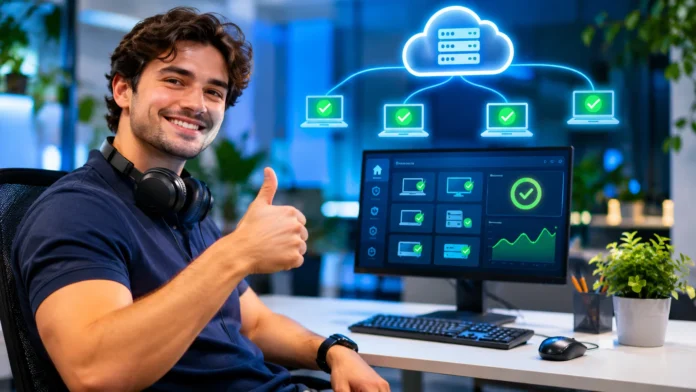
RMM stands for Remote Monitoring and Management, a technology that helps IT professionals monitor, maintain, and manage computers and other devices from a central location. It allows technicians to identify technical problems without physically visiting every device. Businesses use RMM software to maintain system performance, improve security, and reduce unexpected downtime. This approach makes everyday IT management easier and more efficient.
The RMM meaning becomes clearer when you understand its two main functions: monitoring and management. Monitoring involves checking device health, system activity, and potential technical issues. Management focuses on fixing problems, installing updates, and performing maintenance tasks remotely. Together, these functions help IT teams keep business technology running smoothly while reducing repetitive manual work.
Remote monitoring and management is commonly used by managed service providers, internal IT departments, and businesses with multiple locations. Instead of waiting for employees to report computer problems, technicians can receive automated alerts about unusual activity. Many RMM platforms also support remote troubleshooting and software updates. This allows organizations to provide consistent technical support across different offices and devices.
Why Is RMM Important for Modern Businesses?
Modern businesses depend on computers, networks, and software applications to complete daily operations. When these systems stop working, employees may lose access to important information and business services. RMM solutions help organizations identify potential problems before they become serious disruptions. This preventive approach supports business continuity and reduces the time spent resolving unexpected technical issues.
Managing technology becomes more complicated when employees work from different offices or remote locations. Traditional IT support often requires technicians to visit individual computers and perform maintenance manually. Remote monitoring software provides centralized visibility into connected systems, making technical support more convenient. IT teams can monitor multiple devices simultaneously and respond to alerts without traveling between locations.
RMM is especially valuable for growing companies that need reliable IT support without significantly increasing operational costs. Automated maintenance reduces repetitive administrative tasks and allows technicians to focus on more important responsibilities. Businesses can also maintain consistent device settings and update schedules. As their technology environments expand, RMM platforms help maintain control over everyday IT operations.
How Does Remote Monitoring and Management Work?
RMM software typically works through a lightweight application called an agent, which is installed on supported devices. This agent collects information about system health, hardware performance, and software activity. The information is securely transmitted to a centralized management platform. IT technicians use the platform to review device conditions, receive alerts, and perform authorized remote maintenance activities.
For example, imagine an employee’s computer is running low on available storage space. An RMM tool can detect the problem and notify the IT support team automatically. A technician can investigate the issue remotely and determine whether unnecessary temporary files are causing it. Depending on the platform and company policies, approved maintenance actions may also run automatically.
Most RMM platforms include dashboards that display device status, recent alerts, and scheduled maintenance activities. Technicians can organize devices into groups based on location, department, or operating system. This organization makes it easier to apply consistent monitoring rules across an entire business. Centralized reporting also helps managers understand recurring technical problems and plan future improvements.
What Devices Can RMM Software Monitor?
RMM platforms commonly monitor desktop computers, laptops, servers, and other supported endpoints. These devices may use Windows, macOS, Linux, or another operating system, depending on the software provider. Monitoring capabilities vary because not every platform supports the same operating systems or features. Businesses should confirm device compatibility before selecting an RMM solution for their technology environment.
Some remote monitoring and management tools also support network infrastructure, including routers, switches, and firewalls. These devices may be monitored through network protocols, integrations, or other supported connections rather than installed agents. Technicians can track network availability, equipment performance, and connectivity problems. However, the available management actions depend on the equipment and software capabilities.
Businesses may also use RMM platforms to monitor virtual machines, cloud-connected servers, and certain specialized devices. Cloud infrastructure monitoring sometimes requires additional integrations or separate monitoring services. Organizations with mixed technology environments should carefully review supported device types. Understanding these limitations helps prevent gaps in monitoring coverage and ensures that important systems receive appropriate technical attention.
Key Features of RMM Software Explained
One important feature of RMM software is real-time device monitoring, which gives technicians visibility into system performance. Monitoring tools can track processor activity, memory usage, storage capacity, and device availability. When measurements exceed configured thresholds, the platform generates alerts for further investigation. These notifications help IT teams prioritize problems according to their potential impact on business operations.
Another useful feature is remote access, which allows authorized technicians to troubleshoot supported devices from another location. Depending on the platform, technicians may view desktop sessions, run scripts, or perform administrative tasks. Remote support can reduce the need for in-person visits and shorten troubleshooting times. However, businesses should require appropriate permissions and security controls for these sensitive activities.
Many RMM platforms also include software inventory, reporting tools, and maintenance scheduling. Inventory features help businesses understand which applications and devices are being managed. Reporting provides useful information about device health, completed tasks, and unresolved technical issues. These capabilities support better planning and help IT departments demonstrate the value of routine maintenance work.
How RMM Helps With Automation and Patch Management
Automation is one of the most valuable capabilities of remote monitoring and management software. IT teams can schedule repetitive tasks, such as checking system conditions, running approved scripts, and performing routine maintenance. This reduces the amount of manual attention required for basic activities. Automation also helps organizations apply consistent processes across supported devices without relying on individual technicians.
Patch management is another important function available in many RMM tools. Software developers regularly release updates that fix security vulnerabilities, resolve bugs, and improve application stability. RMM platforms can help administrators identify missing patches and deploy approved updates according to scheduled policies. Some systems also report installation failures, allowing technicians to investigate devices that remain outdated.
However, automated patching requires careful planning because updates can sometimes introduce compatibility problems. Businesses should test important changes, schedule maintenance windows, and establish recovery procedures before widespread deployment. Critical servers and specialized business applications may require additional approval steps. A responsible patch management strategy balances timely security improvements with the need to maintain stable business operations.
Who Uses RMM Tools and Why?
Managed service providers, commonly called MSPs, are among the primary users of RMM platforms. These companies provide outsourced IT support to multiple clients with different technology requirements. RMM software allows them to monitor client devices through a centralized interface. Technicians can organize separate customer environments, respond to technical alerts, and perform maintenance while maintaining appropriate access controls.
Internal IT departments also use remote monitoring and management tools to support company-owned technology. Larger organizations may manage hundreds or thousands of devices across multiple offices. A centralized platform helps administrators maintain consistent monitoring policies and identify computers requiring attention. This visibility is particularly useful when employees work remotely or frequently move between business locations.
Smaller companies can benefit from RMM services even when they do not maintain dedicated internal IT teams. They may work with an external technology provider that monitors and maintains their systems. This arrangement can improve access to technical expertise without requiring additional full-time employees. The actual benefits depend on the service agreement, response procedures, and quality of support provided.
Main Benefits of Using RMM Software
One major benefit of RMM technology is improved visibility into the condition of business devices. IT professionals can review performance information and identify warning signs before employees experience serious problems. Early detection may reduce disruptions caused by storage shortages, failing services, or outdated software. While RMM cannot prevent every failure, it supports faster identification and more organized troubleshooting.
Another advantage is greater operational efficiency through centralized management and automated workflows. Technicians can complete routine tasks across multiple devices instead of repeating the same process individually. Remote troubleshooting can also reduce travel requirements and associated support expenses. These improvements may allow IT departments to support growing device inventories without increasing staffing at the same rate.
RMM solutions can also improve accountability by recording monitoring events, maintenance activities, and technician actions. Reports help managers understand recurring issues and evaluate whether support processes are working effectively. Consistent monitoring policies make it easier to maintain similar standards across offices. Businesses gain more useful information for budgeting, technology upgrades, and long-term IT planning decisions.
RMM vs. PSA, MDM, and Remote Desktop Software
RMM and PSA are commonly used together, but they serve different purposes within IT service management. RMM focuses on monitoring devices, automating maintenance, and supporting technical operations. Professional Services Automation, or PSA, focuses on activities such as ticketing, service agreements, billing, and resource management. Integrating these tools can help service providers connect technical alerts with organized support workflows.
Mobile Device Management, known as MDM, is another technology that businesses sometimes confuse with RMM. MDM primarily focuses on managing enrolled mobile devices and applying organizational security policies. Depending on the solution, it can configure devices, control applications, and manage access to business information. RMM generally provides broader monitoring and maintenance capabilities for computers, servers, and supported infrastructure.
Remote desktop software is also different because its main purpose is to provide interactive access to another computer. An authorized technician can use a remote desktop connection to investigate a problem or assist an employee. RMM platforms may include remote desktop functionality alongside monitoring, alerts, and automation. Therefore, remote access is often one feature of RMM rather than its complete purpose.
Is RMM Software Secure for Businesses?
RMM software can support stronger IT security by helping administrators identify outdated systems, monitor devices, and deploy approved updates. However, it also provides powerful remote administration capabilities that require careful protection. Unauthorized access to an RMM platform could expose multiple managed devices to serious risks. Businesses should evaluate security controls before granting software access to sensitive company systems.
Important safeguards include multifactor authentication, role-based permissions, encryption, and detailed activity logging. Organizations should limit administrator privileges and remove accounts that are no longer required. They should also review vendor security practices and apply platform updates promptly. These measures reduce unnecessary exposure and make it easier to detect or investigate suspicious administrative activity.
RMM platforms should complement existing cybersecurity tools rather than replace them completely. Endpoint detection and response, antivirus protection, secure backups, and employee awareness remain important parts of business security. Monitoring software cannot guarantee protection against every cyber threat or configuration mistake. A layered security strategy combines preventive controls, continuous monitoring, and clear incident response procedures.
How to Choose and Implement the Right RMM Software
Choosing the right RMM platform begins with understanding the organization’s technology environment and support requirements. Businesses should identify the number of devices, operating systems, locations, and applications that need monitoring. They should also consider whether remote access, patch management, scripting, and reporting are essential. A clear requirements list makes it easier to compare solutions without paying for unnecessary functionality.
Pricing is another important factor because RMM providers use different subscription and licensing structures. Some charge according to managed endpoints, while others offer technician-based plans or bundled services. Businesses should review onboarding costs, support availability, contract terms, and potential additional charges. Evaluating the total cost of ownership provides a more realistic picture than comparing subscription prices alone.
After selecting a platform, organizations should begin with a controlled implementation rather than immediately enrolling every device. A small pilot group helps technicians test monitoring policies, notifications, remote access controls, and update procedures. They should document problems and adjust settings before expanding deployment. Regular reviews of alert accuracy, device coverage, and technician permissions help maintain a reliable management environment.
Conclusion
Understanding the RMM meaning helps explain how businesses manage technology without constantly performing maintenance in person. Remote Monitoring and Management combines device monitoring, technical alerts, remote support, and automated maintenance within a centralized platform. These capabilities help IT professionals identify problems and maintain supported systems more efficiently. RMM has become an important tool for organizations managing distributed technology environments.
The benefits of RMM extend beyond simple computer monitoring because it also supports organized IT operations. Automated tasks, software updates, and centralized reporting can improve efficiency and reduce repetitive technical work. Managed service providers and internal IT departments use these capabilities to support multiple devices. However, successful results depend on appropriate configurations, trained technicians, and responsible security practices.
Businesses considering RMM should compare available solutions according to compatibility, functionality, security, and overall costs. Starting with a small implementation helps teams understand how the software performs before expanding coverage. Regular monitoring and improvement remain necessary after deployment. With the right planning, RMM can provide a practical foundation for reliable and manageable business technology.
FAQs
What Does RMM Stand for in IT?
RMM stands for Remote Monitoring and Management. It refers to software that allows IT professionals to monitor device performance, receive technical alerts, perform maintenance, and manage supported computers and systems remotely.
What Is the Main Purpose of RMM Software?
The main purpose of RMM software is to help IT teams maintain and support devices efficiently. It provides centralized monitoring, automated maintenance, technical alerts, and remote troubleshooting capabilities.
Is RMM the Same as Remote Desktop Software?
No, RMM and remote desktop software are different. Remote desktop tools mainly provide interactive access to another computer, while RMM platforms offer broader monitoring, maintenance automation, reporting, and device management features.
Can Small Businesses Benefit From RMM?
Yes, small businesses can benefit from RMM through more organized technology maintenance and faster identification of technical problems. They can use an internal IT team or hire a managed service provider.
Does RMM Software Improve Cybersecurity?
RMM software can improve cybersecurity by supporting patch deployment, device visibility, and monitoring activities. However, it should work alongside dedicated security solutions, strong access controls, secure backups, and established cybersecurity procedures.

