
Imagine buying a new router to enjoy faster internet, but your connection still feels slow. You restart your computer, check your internet settings, and even contact your service provider. However, the problem could be something as simple as the network cable connecting your devices.
A twisted pair cable is one of the most common cables used in computer networking. Despite its simple appearance, it plays an important role in transferring data between computers, routers, switches, and other electronic devices.
Understanding how these cables work does not require advanced technical knowledge. This guide explains their construction, types, applications, benefits, and limitations using simple examples. By the end, you will know how to select a suitable cable for your networking needs.
What Is a Twisted Pair Cable?
A twisted pair cable is a communication cable containing pairs of insulated copper wires twisted around each other. These wires carry electrical signals between connected devices. The twisting helps reduce unwanted electrical interference during data transmission.
Think about the cable connecting your desktop computer to your Wi-Fi router. Although its outer covering looks simple, it usually contains four pairs of copper wires. Each pair helps support communication between devices according to the networking technology being used.
These cables are widely used because they provide a practical balance between performance, affordability, and convenience. You can find them in homes, offices, schools, telephone systems, and commercial buildings. They remain an important part of modern communication networks.
What Does a Twisted Pair Cable Look Like?
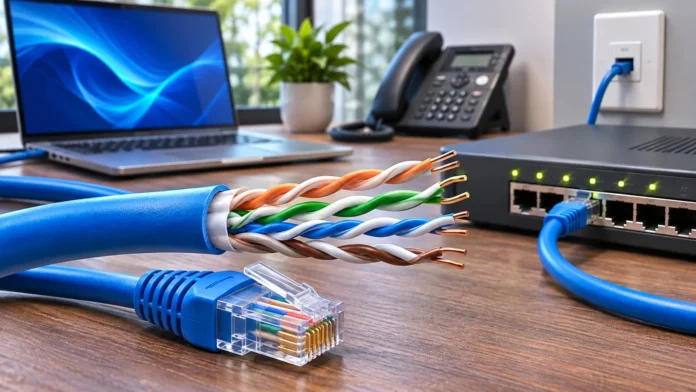
Identifying different networking cables can feel confusing because many have similar outer coverings. However, the internal construction of a twisted pair cable makes it different from coaxial and fiber optic cables. Its copper conductors are arranged into individual twisted pairs.
A typical twisted pair Ethernet cable contains the following components:
- Four pairs of insulated copper wires.
- Color-coded wire insulation.
- A protective outer jacket.
- Modular Ethernet connectors, commonly called RJ45 connectors.
- Additional shielding in certain cable designs.
The colored wires help technicians identify individual pairs during network installation. Meanwhile, the outer jacket protects the internal conductors from ordinary wear. Some higher-category cables also include separators that help maintain the spacing between wire pairs.
How Does a Twisted Pair Cable Work?
Have you ever wondered how information travels from your computer to another device through a simple cable? Networking devices convert digital information into electrical signals for transmission. These signals travel through the copper conductors toward the receiving device.
In balanced communication systems, the receiving device reads the difference between the signals carried by the two wires. External electrical noise often affects both wires in similar ways. Reading their difference helps the receiver distinguish useful information from unwanted interference.
For example, when you send a document from your computer to a network printer, electrical signals carry the encoded information through the network. The receiving equipment processes those signals and recovers the original data. This communication happens quickly without requiring users to understand the underlying process.
Why Are the Wires Twisted Together?
Electrical devices generate electromagnetic fields that can interfere with nearby communication cables. Without suitable protection, this interference may affect signal quality. Data errors and unstable connections can occur when interference becomes severe.
Twisting the wires repeatedly changes their positions relative to nearby sources of electrical noise. This helps both conductors experience similar interference over the cable’s length. Balanced receivers can then reject much of the unwanted noise.
Different wire pairs may also have different twisting rates to reduce interference between neighboring pairs. This internal interference is known as crosstalk. The twisted arrangement helps maintain reliable communication without requiring every cable to have additional metallic shielding.
What Are the Main Types of Twisted Pair Cable?
Choosing a networking cable becomes difficult when you encounter terms such as UTP and STP. Both designs use twisted copper wires, but their protection against interference differs. Understanding these differences helps you avoid buying an unsuitable cable.
Unshielded Twisted Pair Cable (UTP)
An unshielded twisted pair cable contains twisted copper wire pairs without additional metallic shielding. Its construction makes it relatively lightweight, flexible, and affordable. It is commonly used in residential and commercial Ethernet networks.
UTP cables work well in environments where electromagnetic interference is not excessive. For example, connecting a desktop computer to a router in your home generally does not require shielded cabling. A suitable UTP Ethernet cable can provide reliable connectivity.
Shielded Twisted Pair Cable (STP)
A shielded twisted pair cable includes additional metallic protection around individual wire pairs, all pairs together, or both. This shielding helps reduce electromagnetic interference when correctly installed. It can be particularly useful in electrically noisy environments.
STP cables are generally more expensive and less flexible than comparable unshielded cables. They also require compatible components and appropriate grounding or bonding arrangements. Professional network installations may use them where electrical equipment creates significant interference.
UTP vs. STP Cable: What Is the Difference?
Buying a shielded cable simply because it sounds more advanced may increase costs without improving your connection. Your environment, networking equipment, and installation requirements determine which design makes more sense. Both options can deliver excellent performance under suitable conditions.
| Feature | UTP Cable | STP Cable |
|---|---|---|
| Metallic shielding | No | Yes |
| Interference protection | Standard | Additional |
| Cost | Generally lower | Generally higher |
| Flexibility | Generally higher | Generally lower |
| Installation | Relatively simple | More demanding |
| Common applications | Homes and offices | Electrically noisy environments |
| Shield bonding | Not required | Depends on the system design |
For most ordinary home networks, UTP cabling is a practical choice. Shielded cabling becomes worth considering when interference is a genuine concern. Always evaluate your network environment rather than assuming that additional shielding automatically improves internet speed.
Different Categories of Twisted Pair Cable
You may have noticed labels such as Cat5e, Cat6, and Cat6a while shopping for Ethernet cables. These categories describe different cabling performance requirements. Understanding them helps you choose a cable that matches your network speed and distance needs.
| Cable Category | Common Supported Speed | Typical Maximum Channel Distance |
|---|---|---|
| Cat3 | 10 Mbps | 100 meters |
| Cat5 | 100 Mbps | 100 meters |
| Cat5e | 1 Gbps | 100 meters |
| Cat6 | 1 Gbps | 100 meters |
| Cat6 | 10 Gbps | Up to 55 meters under suitable conditions |
| Cat6a | 10 Gbps | 100 meters |
| Cat8 | 25–40 Gbps | 30 meters |
Cat5e remains suitable for many existing gigabit networks, while Cat6 is a practical option for everyday installations. Cat6a supports higher-speed networking over longer distances. Cat8 is primarily intended for specialized, short-distance, high-speed connections.
Remember that purchasing a higher-category cable does not automatically increase your internet speed. Your router, network switch, computer, and internet subscription also influence performance. Every component must support the desired connection speed to achieve the expected results.
Common Uses of Twisted Pair Cable
Many people associate networking cables only with connecting computers to the internet. However, twisted pair wiring supports several communication technologies beyond ordinary internet access. Its affordability and versatility make it useful across different environments.
Home Networking
Twisted pair Ethernet cables connect computers, smart televisions, routers, and gaming consoles. A wired connection can provide consistent performance without relying entirely on wireless signal strength. This is especially useful when devices are located near a router.
Office Networking
Businesses use twisted pair cabling to connect workstations, printers, access points, and networking equipment. These connections allow employees to share files and access business applications. A properly designed network helps maintain reliable communication throughout the workplace.
Telephone Communication
Traditional telephone systems have long used twisted copper wire pairs to carry voice signals. The arrangement helps reduce electrical noise that could affect call quality. Telephone cabling demonstrates how this technology existed long before modern computer networks became widespread.
Security and Smart Devices
Compatible IP security cameras, wireless access points, and internet-connected phones can use twisted pair Ethernet cables. Some devices support Power over Ethernet (PoE), which carries data and electrical power through the same cable. This can simplify network infrastructure when compatible equipment is used.
Advantages of Twisted Pair Cable
Building a reliable network can become expensive when specialized equipment and complicated cabling are involved. Twisted pair cabling offers a practical solution for many everyday communication requirements. Its combination of accessibility and performance makes it widely adopted.
Some important advantages include:
- Affordability: It generally costs less than many specialized fiber optic cabling solutions.
- Convenient installation: Standard Ethernet cables are relatively easy to connect.
- Reduced interference: Twisted conductors help minimize unwanted electrical noise.
- Wide compatibility: Many modern networking devices support copper Ethernet connections.
- Easy replacement: Standard patch cables are widely available.
- Versatility: It supports data, voice, and compatible network-powered devices.
These benefits make twisted pair wiring attractive for both residential and commercial networks. Users can build dependable connections without investing in unnecessarily expensive infrastructure. However, cable quality and proper installation remain important for achieving consistent performance.
Disadvantages of Twisted Pair Cable
Although twisted pair cables offer several benefits, they are not suitable for every networking situation. Ignoring their limitations can result in unstable connections and unexpected replacement costs. Understanding these challenges helps you plan a more reliable network.
Common disadvantages include:
- Limited transmission distance compared with many fiber optic systems.
- Greater vulnerability to electromagnetic interference than fiber.
- Potential signal loss over longer cable runs.
- Performance problems caused by damaged connectors.
- Different speed limitations depending on cable category.
- Physical damage from excessive bending or crushing.
For example, many standard copper Ethernet connections have a maximum channel length of 100 meters. Connecting two buildings across a much greater distance may require a different networking solution. Fiber optic cabling is often more appropriate for such applications.
Twisted Pair Cable vs. Coaxial Cable vs. Fiber Optic Cable
Choosing between different communication cables can feel overwhelming when each promises reliable performance. However, these technologies serve different purposes. Understanding their construction and applications makes the decision much easier.
| Feature | Twisted Pair | Coaxial | Fiber Optic |
|---|---|---|---|
| Transmission medium | Copper wire pairs | Central copper conductor | Glass or plastic fiber |
| Signal type | Electrical | Electrical | Light |
| Relative cost | Generally low | Varies | Varies by installation |
| Transmission distance | Relatively limited | Application-dependent | Often much longer |
| Electrical interference | Possible | Reduced by shielding | Immune |
| Common applications | Local networks | Cable broadband and television | High-speed and long-distance networks |
Twisted pair cables are commonly used for connecting everyday network devices. Coaxial cables are frequently associated with television distribution and cable internet services. Fiber optic cables are particularly valuable where long distances, high capacity, or electrical interference immunity are important.
How to Choose the Right Twisted Pair Cable
Selecting the most expensive cable is not always the best decision. You may spend money on capabilities that your existing networking equipment cannot use. Start by understanding what your network actually requires.
Consider these factors before purchasing:
- Network speed: Check the supported speeds of your router and connected devices.
- Cable length: Measure the distance between your networking devices.
- Cable category: Select a category that supports your required performance.
- Installation environment: Consider nearby sources of electrical interference.
- Build quality: Choose reputable cables with solid copper conductors rather than copper-clad aluminum.
- Future requirements: Consider whether you plan to upgrade your networking equipment.
For example, if you have a 500 Mbps internet connection, a compliant Cat5e or Cat6 cable can be sufficient. Purchasing Cat8 will not make that internet subscription faster. Match the cable to your needs instead of relying on impressive marketing claims.
Common Twisted Pair Cable Problems and Solutions
A slow or unstable wired connection does not always mean your internet service is experiencing problems. A damaged cable, loose connector, or unsuitable network configuration could also affect performance. Checking simple causes first can save time and frustration.
| Common Problem | Possible Solution |
|---|---|
| Slow connection speed | Check cable and device capabilities |
| Frequent disconnections | Try a known-good Ethernet cable |
| Loose connection | Reconnect the Ethernet plug securely |
| Visible cable damage | Replace the damaged cable |
| Excessive cable distance | Review the network design |
| Electrical interference | Consult a qualified network installer |
Start troubleshooting by connecting your device with another working Ethernet cable. You can also check whether your network settings show the expected connection speed. If problems continue, professional testing can help identify hidden cabling or equipment faults.
Frequently Asked Questions
1. What is a twisted pair cable used for?
A twisted pair cable is used for transmitting electrical communication signals. Common applications include computer networks, telephone systems, office communication networks, internet-connected devices, and compatible Power over Ethernet equipment.
2. Why is it called a twisted pair cable?
It gets its name from its internal construction, where insulated copper wires are twisted around each other in pairs. This arrangement helps reduce electromagnetic interference and crosstalk during data transmission.
3. Is a twisted pair cable the same as an Ethernet cable?
Not exactly. Many Ethernet cables use twisted pair construction, but twisted pair wiring also supports telephone systems and other communication technologies. Ethernet can additionally operate over media such as fiber optic cables.
4. Which twisted pair cable is best for home networking?
Cat6 UTP is a practical choice for most home networks. Existing Cat5e cables can also support gigabit connections. Your ideal choice depends on equipment compatibility, cable length, and networking requirements.
5. What is the maximum length of a twisted pair cable?
Many common twisted pair Ethernet standards support a maximum channel length of 100 meters. However, the permitted distance depends on the cable category, networking technology, transmission speed, and installation conditions.
Conclusion
A twisted pair cable is a simple yet important technology that supports everyday communication. From home internet connections to business networks, its twisted copper wires help transmit information while reducing unwanted electrical interference.
Understanding the differences between UTP, STP, and various cable categories makes choosing networking equipment easier. You do not necessarily need the fastest or most expensive cable. You need one that matches your devices, environment, and performance requirements.
Start by checking the category printed on your existing Ethernet cable and comparing it with your network equipment’s capabilities. Replace damaged or unsuitable cables when necessary. Making informed networking decisions today can help you avoid unnecessary expenses and connectivity problems tomorrow.

